GPT Image 2 AI Art Prompt Guide: Scenes के Across Character Consistency कैसे रखें
GPT Image 2 Team
10 मई 2026
GPT Image 2 AI art में characters को scenes के across recognizable रखने के लिए practical prompt guide, जिसमें identity anchors, reference image workflows, prompt templates, evaluation steps और troubleshooting शामिल हैं.
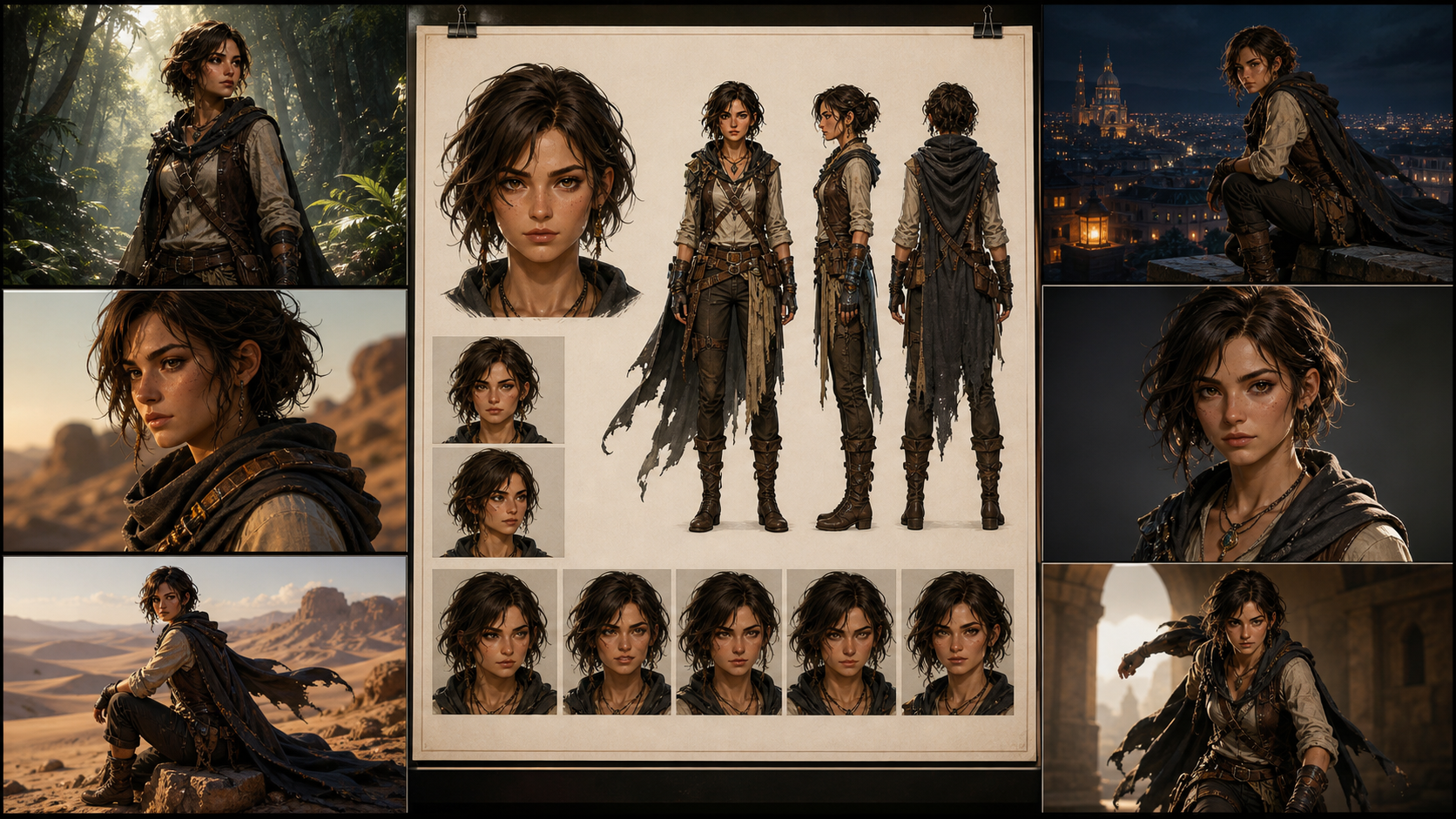
Character consistency prompt-to-art production के सबसे कठिन हिस्सों में से एक है. Single image impressive दिख सकती है, लेकिन story, game pitch, concept deck, comic page या character art series को कुछ ज्यादा सख्त चाहिए: camera angle, lighting, outfit और emotional beat बदलने पर भी वही व्यक्ति पहचान में आना चाहिए.
यह guide उन AI art creators के लिए है जो character art, concept art, prompt-to-art production और scene-by-scene visual development में GPT Image 2 style workflows इस्तेमाल करते हैं. लक्ष्य perfect identity lock का वादा करना नहीं है. Current identity-consistency research और official GPT Image guidance एक ही practical truth दिखाते हैं: consistency एक workflow है, magic नहीं. Stronger prompt मदद करता है, लेकिन prompt अकेला पूरा system नहीं है.
Reliable approach है process को engineer करना. आपको character anchor, indexed reference images, layered prompts, small controlled edits, stable output settings, version records और ऐसा review method चाहिए जो drift को पूरे project में फैलने से पहले पकड़ सके.
Character Consistency का असली मतलब
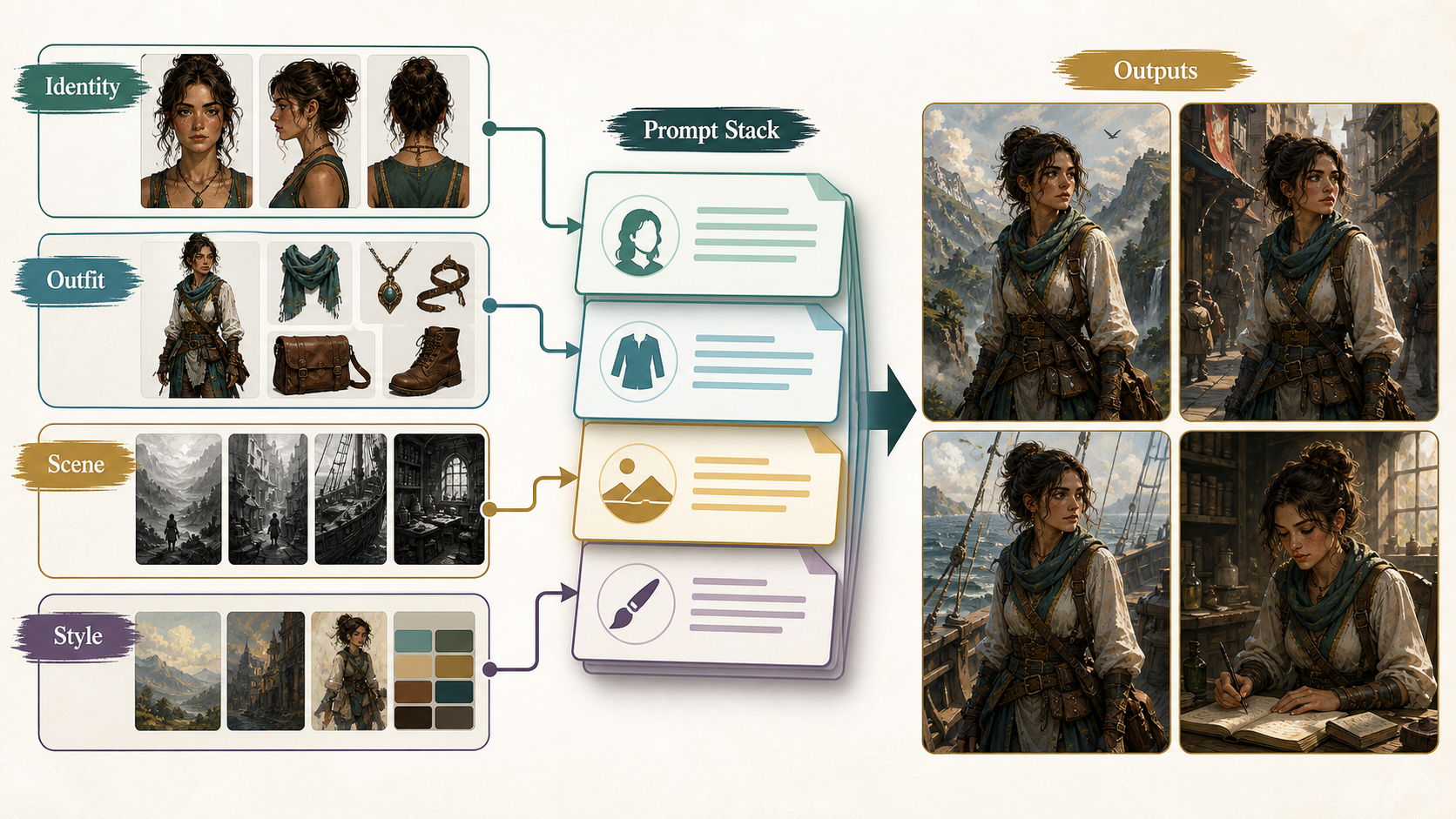
AI art production में character consistency का मतलब हर pixel identical होना नहीं है. इसका मतलब है कि viewer मानता है कि images की sequence में वही character है. Practically, यह recognition कई stable identity cues पर depend करती है:
| Layer | Stable क्या रहना चाहिए | क्या carefully बदल सकता है |
|---|---|---|
| Identity | face geometry, age range, skin tone, ethnicity cues, hairline, hair length, hair texture, scars, tattoos, body proportions | expression, head turn, partial shadow, facial tension |
| Styling | clothing silhouette, core color palette, signature accessories, posture language | weather layers, damage, dirt, formal variants, seasonal outerwear |
| Scene | location, lighting, weather, camera, pose, composition, medium | लगभग सब कुछ, अगर उसे scene change के रूप में clearly declare किया गया है |
गलती यह है कि सभी details को बराबर मान लिया जाता है. वे बराबर नहीं हैं. Face geometry, hairline, body proportion, core outfit silhouette और signature accessories identity संभालते हैं. Background, camera, lighting, pose और weather scene संभालते हैं. अगर prompt दोनों groups को एक साथ बदलता है, तो model के पास clear priority नहीं रहती और character drift होने लगता है.
एक realistic production target यह है: एक character को 5 से 50 images में believable बनाए रखना, जबकि pose, emotion, framing, light, weather और scene design में controlled variation की अनुमति देना. Prompt-only workflow से biometric identity system जैसा व्यवहार expect न करें. इसके बजाय repeatable pipeline बनाएं जो drift घटाए और repair का साफ तरीका दे.
Character Bible से शुरू करें
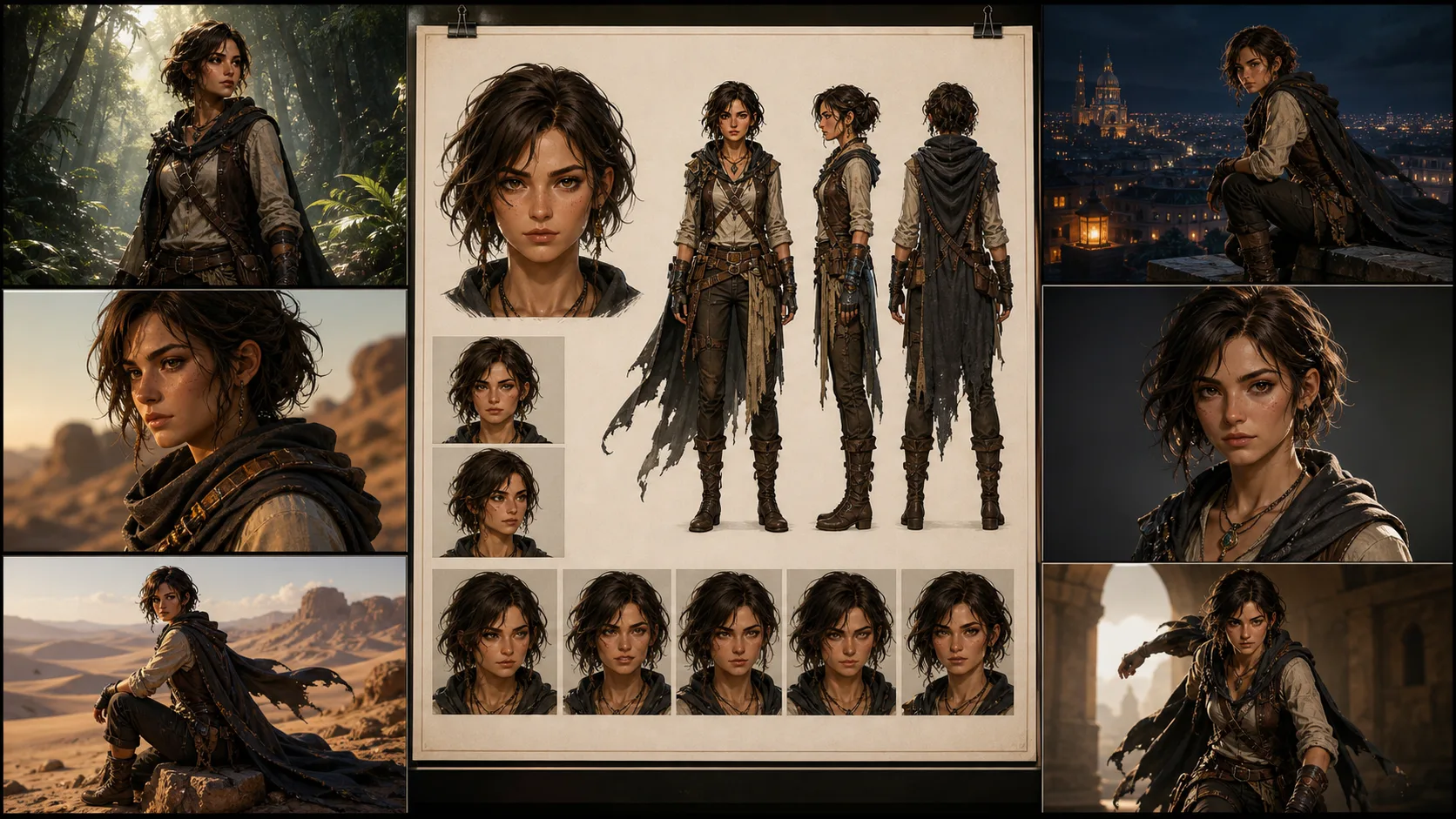
Twenty scenes मांगने से पहले character bible बनाएं. यह reference set है जो story complicated होने से पहले character define करता है.
Useful minimum set में चार images होती हैं:
- Front portrait, neutral lighting, clear face.
- Full-body standing pose, neutral background, complete outfit.
- Three-quarter view, जिसमें hair shape, nose, jaw और profile cues दिखें.
- Expression sheet, जिसमें controlled emotion changes में face दिखे.
Production में files को simple names दें. Boring naming system poetic नामों से बेहतर है, क्योंकि वह revisions survive करता है:
CHAR_A/
  bible/
    CHAR_A_face_front_v01.png
    CHAR_A_fullbody_v01.png
    CHAR_A_threequarter_v01.png
    CHAR_A_expressions_v01.png
  outfits/
    CHAR_A_outfit_core_v01.png
    CHAR_A_outfit_winter_v02.png
  scenes/
    SCN_001_rooftop_dusk_v01.json
    SCN_014_rain_alley_low_angle_v03.json
Character bible clean, boring और useful होना चाहिए. Anchor set में dramatic lighting, extreme angles, heavy motion blur या half-hidden faces से बचें. ये choices cinematic लग सकती हैं, लेकिन weak references बनाती हैं. Model से performance मांगने से पहले उसे character समझने दें.
Long Prompt Soup की जगह Layered Prompting इस्तेमाल करें
Long prompts automatically बेहतर नहीं होते. अक्सर वे competing instructions का ढेर बन जाते हैं. Maintainable prompt को identity, styling, scene, camera, lighting और constraints अलग रखने चाहिए.
Starting point के रूप में यह structure इस्तेमाल करें:
Task:
Create a new scene featuring the same recurring character.

Character anchor:
ID: <CHAR_ID>
Age range: <AGE_RANGE>
Skin tone and ethnicity cues: <SKIN_AND_ETHNICITY>
Face: <FACE_GEOMETRY>
Hair: <HAIRLINE_LENGTH_TEXTURE_PARTING>
Marks: <SCARS_TATTOOS_PLACEMENT>
Body proportions: <BODY_PROPORTIONS>
Core outfit: <OUTFIT_SILHOUETTE_COLORS>
Signature accessories: <ACCESSORIES>
Posture language: <POSTURE_LANGUAGE>

Scene:
<LOCATION_ACTION_STORY_BEAT>

Camera:
<SHOT_SIZE>, <ANGLE>, <FRAMING>, <LENS_FEEL>

Lighting:
<LIGHT_SOURCE>, <TIME_OF_DAY>, <WEATHER>, <COLOR_TEMPERATURE>

Style:
<ART_STYLE_OR_PHOTOREALISTIC_LOOK>

Preserve:
same identity, same face geometry, same hairline, same body proportions,
same core outfit silhouette, same signature accessories, same age range

Change only:
<CONTROLLED_SCENE_DELTA>

Exclude:
no extra characters, no extra jewelry, no text, no watermark, no logos,
do not change age, skin tone, ethnicity cues, or facial structure
यह fancy नहीं है. यही point है. यह model को clean hierarchy देता है और आपको scenes के across reuse करने योग्य template देता है. Scene fail हो तो आप पूरी prompt दोबारा लिखने के बजाय एक block inspect कर सकते हैं.
सबसे जरूरी Instruction: Preserve vs Change
Official GPT Image guidance के अनुसार edits तब बेहतर काम करते हैं जब आप साफ बताते हैं कि क्या बदलना है और क्या वैसा ही रखना है. Character consistency में यह सबसे उपयोगी habit है.
Weak instruction:
Put the same woman in a snowy city at night.Stronger instruction:
Change only the environment from a clear dusk rooftop to a snowy city street at night.
Keep the same character, same face geometry, same hairline, same body proportions,
same core outfit, same silver ear cuff, same camera angle, and same framing.
Only update the lighting, snowfall, wet pavement, and background architecture.
No extra text, no watermark, no logo.
दूसरा version लंबा है, लेकिन bloated नहीं. हर extra phrase एक common failure mode को narrow करता है. यह model को बताता है कि new scene solve करने के लिए नया face, outfit या camera invent न करे.
Multi-scene work में हर prompt को controlled edit की तरह treat करें. Fresh image generate करते समय भी ऐसे लिखें जैसे कह रहे हों: character anchor preserve करो, यह scene variable बदलो.
Reference Images: हर Image को एक Job दें
Reference images GPT Image 2 AI art prompt workflow में सबसे strong stabilizer हैं. लेकिन roles define न हों तो reference images आपस में लड़ सकती हैं.
Indexed references इस्तेमाल करें:
Reference image roles:
Image 1: face and hair identity anchor.
Image 2: full-body proportions and core outfit silhouette.
Image 3: style reference only, do not copy the person from Image 3.
Image 4: scene sketch or composition reference, optional.
फिर prompt में role repeat करें:
Use Image 1 only to preserve the character's face, hairline, and hair texture.
Use Image 2 to preserve body proportions, outfit silhouette, color palette, and accessories.
Use Image 3 only for brushwork, color mood, and rendering style.
Do not borrow identity, clothing, or facial details from Image 3.
Use Image 4 only for composition and camera placement.
यह जरूरी है. अगर style reference में खूबसूरत character है, तो model उस व्यक्ति का face absorb कर सकता है. अगर pose reference में अलग clothing है, तो outfit drift हो सकता है. अगर cinematic reference में strong shadows हैं, तो face anchor छिप सकता है. Reference images भी magic नहीं हैं. वे inputs हैं जिन्हें boundaries चाहिए.
Cleanest workflow के लिए identity reference neutral रखें, outfit reference full-body रखें, style reference character-free रखें अगर possible हो, और composition reference simple रखें.
Scenes को Small Steps में Build करें
Common failure pattern है एक generation में पांच dimensions बदलने की कोशिश:
- same character,
- new outfit,
- new pose,
- new camera angle,
- new lighting,
- new medium,
- new location.
अगर identity important है, तो यह बहुत ज्यादा है. Work को steps में split करें:
- Face और full-body anchor lock करें.
- Same character को target camera angle में generate करें.
- Pose बदलें.
- Environment बदलें.
- Weather या lighting add करें.
- केवल outerwear या costume variant बदलें.
- Identity stable होने के बाद ही style convert करें.
Anime, watercolor, comic ink और अन्य stylized outputs में यह खास जरूरी है. Style transfer identity को आसानी से खा सकता है. Styles cross करते समय explicit instructions लिखें, जैसे "same facial proportions", "same hairstyle silhouette", "same color palette", और "do not enlarge the eyes or make the character younger."
5 से 50 Scenes के लिए Production Pipeline
Real character art series में सभी scenes पहले generate करके बाद में review न करें. इससे inconsistent images का ढेर बनता है और cause clear नहीं रहता.
यह pipeline इस्तेमाल करें:
| Stage | Output | Quality check |
|---|---|---|
| 1. Character definition | written identity sheet and anchor prompts | identity cues are specific, not vague |
| 2. Character bible | portrait, full body, three-quarter view, expression sheet | same person across all anchors |
| 3. Spec freeze | fixed model choice, size, quality, reference set, prompt template | future runs can be compared fairly |
| 4. Scene planning | one structured prompt per scene | each scene has one primary change |
| 5. Batch generation | 2 to 4 candidates per scene | reject obvious face and outfit drift early |
| 6. Targeted repair | edit only the failed element | preserve list repeated every time |
| 7. Final review | side-by-side anchor comparison | identity, outfit, and story beat pass together |
हर accepted image के लिए records रखें:
character_id
scene_id
model_or_snapshot
size
quality
prompt_version
final_prompt
revised_prompt_if_available
reference_image_ids_or_filenames
previous_response_or_image_id_if_used
accepted_output_filename
review_notes
यह administrative लगता है, लेकिन chaos रोकता है. अगर scene 14 अच्छा है और scene 15 drift करता है, तो आपको पता होना चाहिए कि क्या बदला. Records के बिना आप guess कर रहे हैं.
Adapt करने योग्य Prompt Templates
Template 1: Character Anchor From Scratch
Task:
Create a clean character anchor for a recurring AI art series.

Character:
ID: CHAR_A
Age range: late 20s
Skin tone and ethnicity cues: warm medium skin tone, mixed East Asian and Latin features
Face: oval face, defined cheekbones, straight nose bridge, slightly sharp jawline
Hair: black shoulder-length wavy hair, center part, clean visible hairline
Marks: small diagonal scar at the outer end of the left eyebrow
Body: lean athletic build, medium height, narrow shoulders, long legs
Core outfit: cropped charcoal utility jacket, white ribbed shirt, high-waisted black cargo pants
Accessories: single silver ear cuff on left ear, thin black wristband
Palette: charcoal, black, white, muted teal accent
Posture: alert, grounded, slightly guarded

Scene:
plain warm gray studio background, full body visible, standing naturally

Camera:
full body, eye-level, centered, natural 50mm portrait feel

Lighting:
soft studio light, neutral color temperature, clear face visibility

Style:
high-detail character concept art, clean realistic rendering

Preserve:
same face geometry, same hairline, same body proportions, same outfit silhouette,
same scar, same silver ear cuff, same wristband

Exclude:
no extra characters, no text, no watermark, no logo, no dramatic shadow across the face
Template 2: Reference Images के साथ New Scene
Task:
Create a new scene with the same recurring character.

Reference image roles:
Image 1: face and hair identity anchor.
Image 2: full-body proportions and core outfit anchor.
Image 3: rainy neon color mood only, do not copy any person from Image 3.

Scene:
the character runs through a narrow neon alley during heavy rain,
wet pavement reflecting magenta and green signs

Camera:
wide full-body shot, low angle, dynamic motion, 24mm cinematic feel

Lighting:
neon reflections, sodium street light from the rear, cool rain haze

Style:
photorealistic cinematic concept art

Preserve:
same identity as Image 1, same face geometry, same hairline, same scar,
same body proportions from Image 2, same core outfit silhouette,
same silver ear cuff and wristband

Change only:
pose becomes running, jacket surface becomes wet, environment becomes rainy neon alley

Exclude:
no umbrella, no hat, no extra jewelry, no extra text, no watermark, no logo
Template 3: Identity खोए बिना Style Conversion
Task:
Convert the existing character scene into a black-and-white comic ink style.

Preserve:
same character identity, same facial proportions, same hairstyle silhouette,
same scar location, same body proportions, same outfit silhouette,
same camera angle, same framing, same pose

Change only:
rendering medium changes to black-and-white comic ink,
with bold shadows, clean linework, and high contrast rain reflections

Exclude:
do not make the character younger, do not enlarge the eyes,
do not change hair length, do not remove the eyebrow scar,
no text, no watermark, no logo
Evaluation: सिर्फ Vibes पर भरोसा न करें
Human review जरूरी है, लेकिन vague taste काफी नहीं. एक small benchmark set बनाएं और reuse करें.
Practical benchmark में शामिल हो सकता है:
- front close-up,
- three-quarter face,
- full-body standing pose,
- seated pose,
- running action,
- low-angle hero shot,
- top-down scene,
- rainy night,
- snowy night,
- outfit overlay,
- strong emotion,
- style conversion.
हर scene के लिए same reference set और template से multiple candidates generate करें. Candidates को anchor के side-by-side review करें, isolation में नहीं.
Seven-point human rubric इस्तेमाल करें:
| Question | Pass condition |
|---|---|
| Is it the same face? | major facial geometry and age range match |
| Is the age range stable? | the character is not made younger or older without intent |
| Are skin tone and ethnicity cues stable? | no accidental identity recast |
| Is the hairstyle stable? | hairline, length, texture, and silhouette remain recognizable |
| Are body proportions stable? | height, build, and limb proportions feel consistent |
| Is the core outfit stable? | silhouette, palette, and signature accessories survive |
| Did the scene task succeed? | the required action, setting, camera, and mood are present |
अगर automated checks इस्तेमाल करते हैं, तो उन्हें support की तरह रखें, final truth की तरह नहीं. Face embeddings, perceptual similarity tools और vision-language scoring outliers flag करने में मदद कर सकते हैं, लेकिन stylized rendering, occlusion, profile views या heavy lighting changes में fail हो सकते हैं. Final question अब भी visual है: क्या reader या art director मानेगा कि यह वही character है?
Common Drift Problems की Troubleshooting
| Problem | What it looks like | Fastest fix |
|---|---|---|
| Face drift | eyes, jaw, nose या hairline match नहीं करते | face reference इस्तेमाल करें, preserve list repeat करें, scene change घटाएं |
| Outfit drift | jacket, colors, accessories या silhouette बदलते हैं | full-body outfit reference add करें, core outfit को outerwear से separate करें |
| Style eats identity | anime या watercolor version अलग व्यक्ति बन जाता है | same facial proportions और same hairstyle silhouette specify करें, identity stable होने के बाद style convert करें |
| Camera drift | angle, crop या perspective unexpectedly बदलता है | camera block और preserve list में shot size, angle, framing, lens feel डालें |
| Local edit spillover | earrings ठीक करते हुए hair या face बदल जाता है | edit narrow करें, available हो तो mask इस्तेमाल करें, "change only" instructions repeat करें |
| Over-copying reference | face pasted या stiff लगता है | multiple angles इस्तेमाल करें, identity preserve करते हुए expression और lighting variation allow करें |
| Text and logos appear | random letters, watermark-like marks, fake branding | हर production prompt में "no text, no watermark, no logo" रखें |
ज्यादातर failures एक साथ बहुत ज्यादा change मांगने से आते हैं. Doubt हो तो simplify करें. Cleaner intermediate version generate करें, फिर एक controlled edit करें.
Practical Settings Advice
Project में stable settings इस्तेमाल करें. अगर आप model version, image size, quality level, reference set और prompt structure एक साथ बदलते हैं, तो पता नहीं चलेगा कि drift किस variable से आया.
Character art के लिए anchors में portrait या square format इस्तेमाल करें. Landscape तभी इस्तेमाल करें जब scene को जरूरत हो. Final export size को identity testing से अलग रखें: बहुत बड़े या experimental output sizes delivery में useful हो सकते हैं, लेकिन consistency review baseline के लिए कमजोर हैं.
Drafts के लिए कई candidates generate करें. Approved finals के लिए variation कम करें और exact prompt और references log करें. अगर workflow revised prompt या continuation ID expose करता है, तो save करें. Production consistency records पर भी उतनी ही निर्भर है जितनी prompts पर.
अपने workflow को उन controls पर न बनाएं जो आपके GPT Image 2 image interface में publicly specified नहीं हैं. अगर seed, sampling steps या guidance scale exposed नहीं हैं, तो उन्हें repeatability system का हिस्सा मानने का दिखावा न करें. जो controls सच में हैं उनका इस्तेमाल करें: references, prompt structure, edits, available होने पर image IDs या previous responses, stable size, stable quality और careful review.
Final Takeaway
Character consistency के लिए best GPT Image 2 AI art prompt guide कोई single secret prompt नहीं है. यह disciplined workflow है:
- story से पहले character define करें,
- identity को scene change से separate करें,
- हर reference image को एक job दें,
- small edits करें,
- बदलने से ज्यादा preserve करें,
- हर accepted run record करें,
- anchors के against review करें,
- drift को तुरंत repair करें.
इसी तरह prompt-to-art experiments usable character art, concept art, comic development और production-ready scene sequences में बदलते हैं. Consistency achievable है, लेकिन उसे manage करना पड़ता है.