If the prompt words are written correctly, the AI words will be half correct: Practical combat of text rendering prompt word engineering
AI 测评室
May 4, 2026
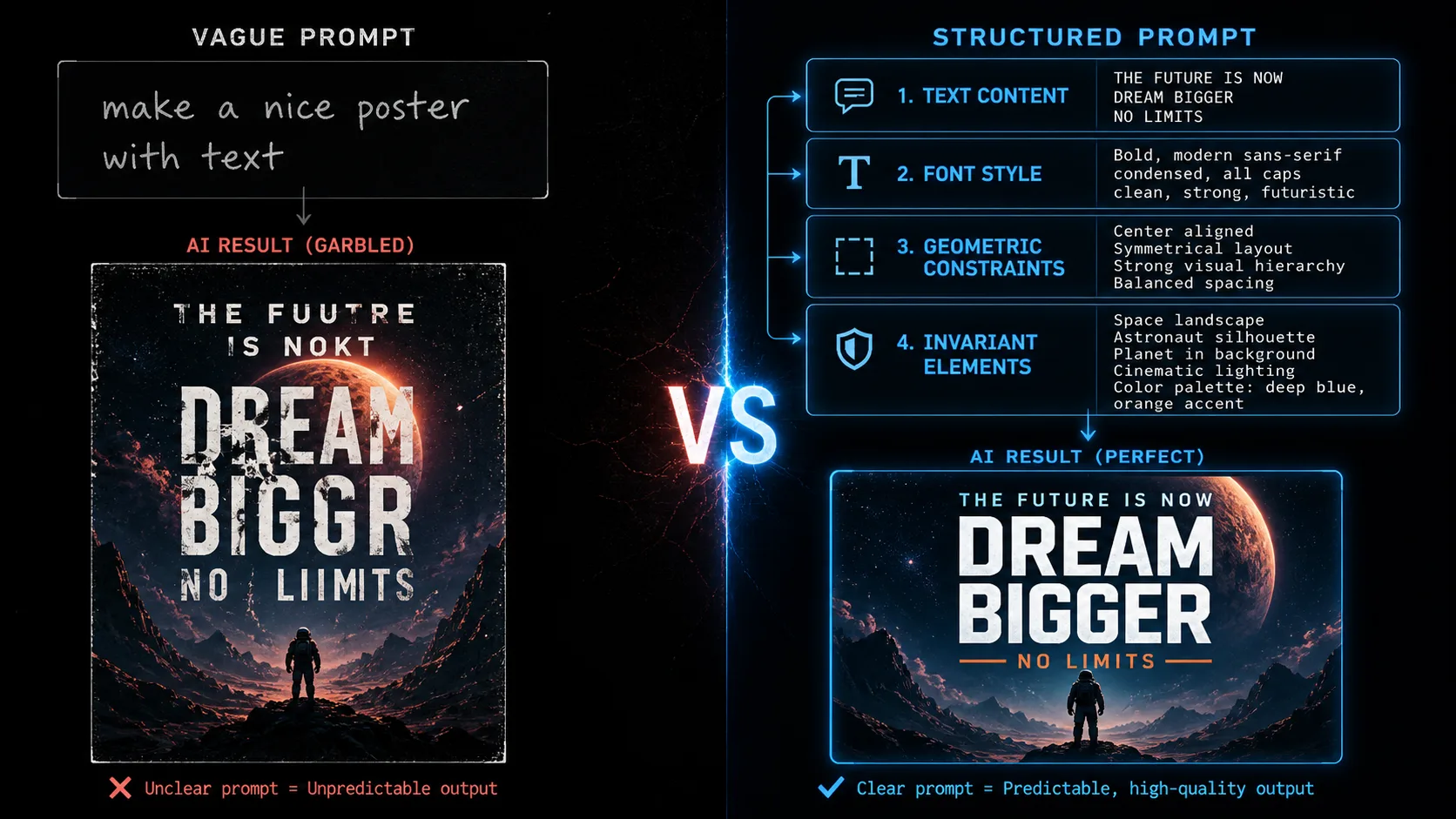
The same model, the same requirement, but the prompt words are written
The same model, the same requirement, but the prompt words are written in different ways, the text accuracy can be three times worse.
The prompt word is not metaphysics, but engineering
The way many people write AI image prompt words is to "write whatever comes to mind", and then find that the text always makes mistakes, and they feel that "the model is not good". But with the same model and the same requirements, some people's text accuracy can reach 80%, while others can only have 20% - the difference lies in the way the prompt words are written.
The prompt word project is not to "write a long description", but to clearly describe the four dimensions of text content, glyph style, geometric constraints, and invariant elements. What the model needs is not your exclamation points and adjectives, but precise instructions.
This article will give you a set of prompt word template libraries that can be directly reused, covering the three mainstream platforms of Stable Diffusion, OpenAI GPT Image 2, and Midjourney. They are classified into three scenarios: posters, labels, and infographics. Each template comes with parameter descriptions and pitfall guides.
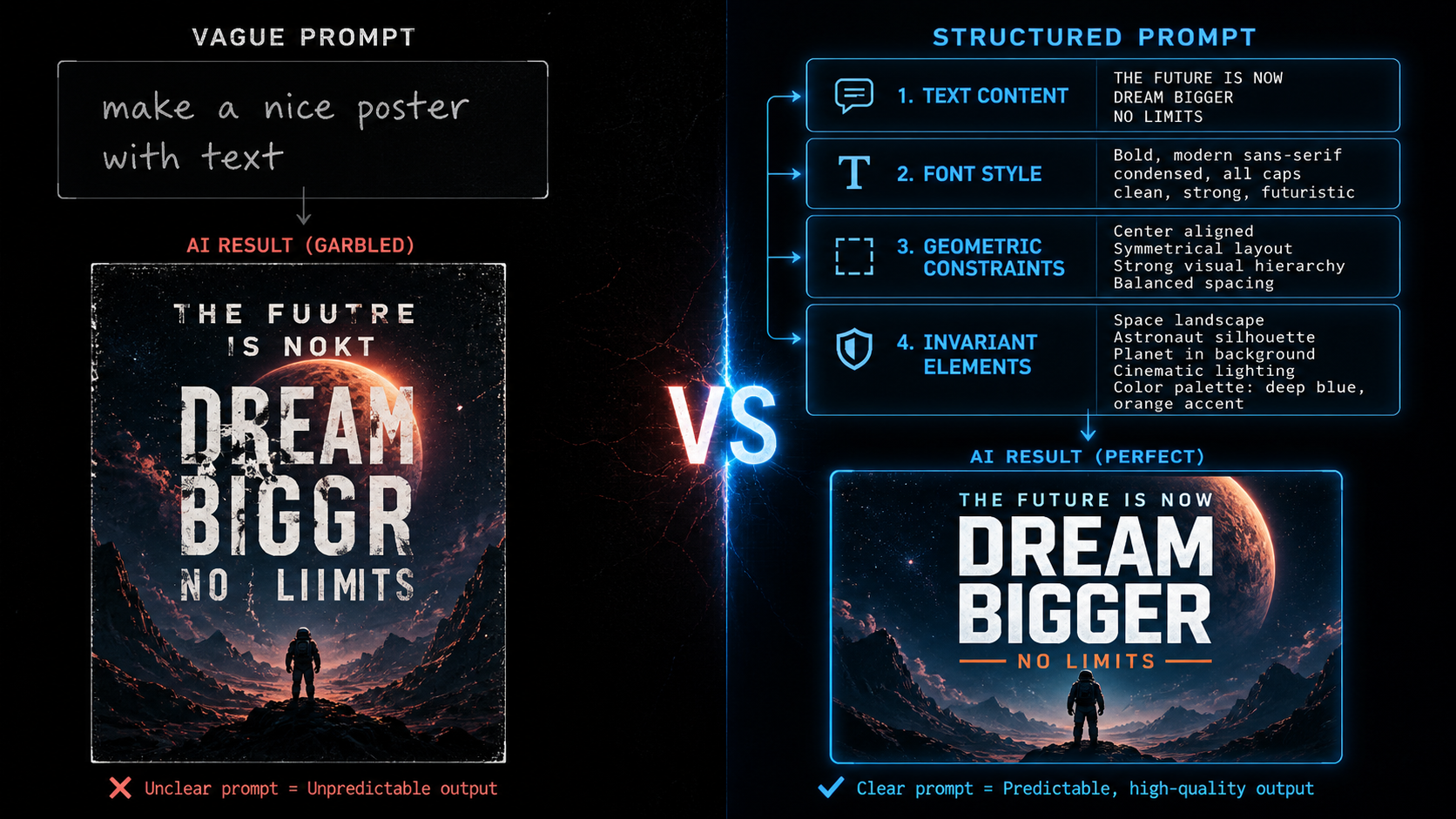
Four-layer structure of prompt words
No matter which model is used, the prompt words for text rendering should contain four layers of information:
First layer: text content. Specific text that needs to appear on the screen. Wrap it in quotation marks to explicitly tell the model "these words must be rendered exactly".
The second layer: glyph style. Font type (serif/sans serif), font weight (bold/regular), font size level. Writing "Modern Chinese sans serif font, bold title" is more effective than writing "Use Siyuan Heibo" - the model may not necessarily know the specific font name, but it can understand the style description.
Level 3: Geometric constraints. The position, size, alignment, and line spacing of the text. The more accurate the model is, the less likely it is to make its own decisions.
Level 4: Invariant elements. What cannot be changed - background texture, light and shadow, product body, perspective relationship. Use constraints like preserve, do not change, maintain.
Breaking down these four layers and writing them is much more effective than cramming all the information into one long sentence.
Platform 1: Stable Diffusion Inpainting prompt words
Stable Diffusion's inpainting is one of the most flexible solutions for local character modification. Its prompt words are divided into two parts: positive and negative.
Positive prompt word template
replace only the masked text with crisp [字体风格] text '[目标文字]',
exact baseline alignment, preserve poster texture, lighting, shadows, perspective
Negative prompt word template
garbled text, duplicate letters, extra glyphs, warped text, blur, low contrast, artifactsKey parameters
| Parameters | Recommended values | Description |
|---|---|---|
strength | 0.25-0.45 | The lower the value, the more conservative it is, retaining more original image information. 0.25 is suitable for changing only the text without changing the background, 0.45 is suitable for fine-tuning the surrounding area |
guidance_scale | 4-7 | The higher the value, the more prompt words will be followed, but too high will cause over-sharpening |
num_inference_steps | 28-40 | The more steps, the better the quality, but the slower the speed |
Poster title template
正向:replace masked headline with bold white sans-serif text 'SUMMER SALE',
crisp sharp edges, exact horizontal alignment, preserve gradient background and shadows

负向:garbled text, misspelled words, duplicate letters, warped baseline, blur, extra characters
Parameters: strength=0.30, guidance_scale=5.5, steps=32
Brand name template
正向:replace masked text with clean logo-style text 'NATURA',
letter-spacing uniform, preserve brand color scheme and background texture

负向:garbled text, wrong font weight, uneven spacing, artifacts, low resolution
Parameters: strength=0.25, guidance_scale=6.0, steps=36
Masking suggestions
- Poster title: word-level rectangular mask, expanding outward 2-6px
- Brand name: Overall rectangular mask, including surrounding white space
- Price numbers: exact rectangular mask, no expansion - the background of the number area is usually very simple, and expansion introduces noise
Platform 2: OpenAI GPT Image 2 editing flow prompt words
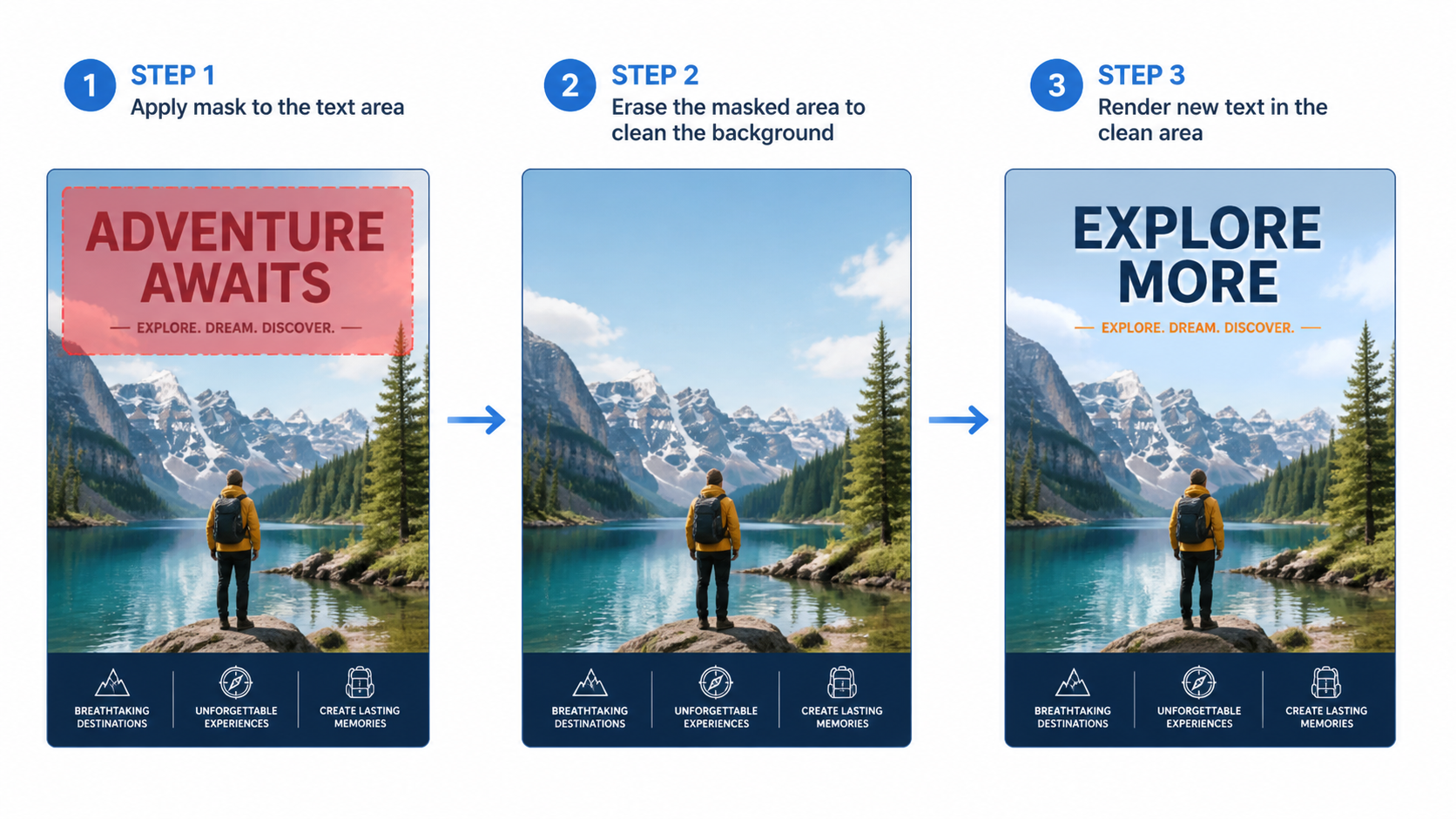
The editing flow of GPT Image 2 implements local modification through the mask parameter. The prompt word needs to describe "only what to change and what to keep" in natural language.
Basic syntax
from openai import OpenAI
client = OpenAI()

result = client.images.edit(
    model="gpt-image-2",
    image=open("poster.png", "rb"),
    mask=open("mask.png", "rb"),   # 与原图同尺寸、同格式,带 alpha 通道
    prompt='Replace only the masked headline with crisp white sans-serif text "OPEN STUDIO". Preserve perspective, paper texture, and shadows.'
)
mask file requirements
- Same size as the original image (consistent at pixel level)
- Same format as the original image (both PNG or both JPEG)
- With alpha channel (transparent areas = not modified, opaque areas = to be modified)
- ChatGPT Images official help page reminder: selection highlighting is not always accurate, and editing may exceed the selected area - so leave appropriate margins in the mask area
Poster lettering template
Replace only the masked headline with clean white sans-serif text "SUMMER SALE".
Text must be crisp, sharp, with uniform letter spacing.
Preserve poster background, gradient, shadows, and all unmasked elements.
Do not add extra text, watermarks, or decorative elements.
Label modification template
Replace only the masked text area with clean product label text "Ingredients: Water, Glycerin, Niacinamide".
Font: small, precise, uniform sans-serif. Match existing label style.
Preserve bottle shape, label material texture, and all surrounding elements.
Do not change product name, logo, or barcode.
Chinese poster template
请只替换蒙版区域的文字为清晰的中文无衬线字体"新消费品牌增长论坛"。
文字必须笔画完整、大小均匀、行距一致。
保持海报背景、光影、透视和所有未蒙版元素不变。
不要添加额外文字、装饰或水印。
Key Tips
Tip 1: Wrap the target text in quotation marks. "SUMMER SALE" is better than SUMMER SALE for the model to understand that this is what needs to be accurately represented.
Tip 2: Clearly say "only change the masked area". Replace only the masked area is much more accurate than Fix the text - the former limits the scope of modifications, while the latter may cause the model to re-render the entire image.
Tip 3: List the elements that cannot be changed. Preserve background, shadows, perspective, all unmasked elements - This constraint can significantly reduce the situation of "changing a word, the background also changes".
Tip 4: Add the "do not rewrite" constraint to the Chinese scene. 文字必须严格按以下内容排版,不要改写、不要增删、不要替换同义词 - This is crucial for business posters that require legal review.
Platform 3: Midjourney partial word modification prompts
Midjourney's Editor and Vary Region features support selection redrawing. Officials recommend that prompts be short and direct, with parameters placed at the end.
Basic syntax
clean swiss poster headline::2 geometric background::1 exact text OPEN STUDIO crisp sans serif aligned baseline --ar 2:3 --rawWeight system
Midjourney uses :: to separate different parts of the prompt word, and the following number is the weight. For text rendering, set the weight of the text content high:
exact text "SUMMER SALE"::3 clean poster design::1 minimalist background::1 --ar 16:9 --raw::3 means that the weight of text content is 3 times that of other parts, and the model will work harder to write the words correctly.
Poster title template
clean bold sans-serif headline text "SUMMER SALE"::3 geometric gradient poster background::1 exact baseline alignment sharp crisp edges --ar 16:9 --rawBrand Identity Template
logo text "NATURA"::3 clean minimalist brand identity::1 letter-spacing uniform professional typography --ar 1:1 --rawLimitations of Midjourney
Midjourney's strength is visual style, not textual precision. Less control over long text (more than 5 words) and precise kerning than Stable Diffusion and GPT Image 2. Its best uses are: Stylized short words, concept poster titles, rapid iteration of brand names.
Cross-platform general skills
No matter which model is used, the following tips can improve the accuracy of text rendering:
Wrap the target text in quotation marks
Enclose the text that needs to appear in the picture in quotation marks, and the model will treat it as content that "must be presented accurately" rather than a description that "can be played freely". This trick works on all platforms.
Explicitly declare location
Don’t just write “put the title at the top”, write “place the main title centered in the top 20% of the screen, with the largest font size”. The more accurate the model is, the less likely it is to make its own decisions.
Specify font style instead of font name
Writing "Modern sans serif font, bold titles" is more effective than writing "Use Helvetica." The model may not necessarily know the specific font name, but it can understand the style description.
Control the amount of text
Work on only 1-3 words or phrases at a time. The more words there are, the higher the chance of error. If you need to modify multiple text areas, do it multiple times, one area at a time.
Erase first and then write
Don't overwrite new text directly on top of existing text. First use inpaint to erase the original text (leave the prompt word blank or write remove text). After confirming that the background is clean, do a second inpaint to write new text. Two steps are safer than one.
Negative reminder words cannot be omitted
Stable Diffusion's negative prompt words have a great impact on the text rendering effect. garbled text, duplicate letters, extra glyphs These three items are almost a must.
A complete word modification prompt word workflow
Take a Chinese promotional poster as an example. The title needs to be changed from garbled characters to "Limited time special offer":
Step 1: Erase original text
正向:clean background, remove all text, preserve gradient and shadows
负向:text, letters, words, watermark
参数:strength=0.40, guidance_scale=5.0, steps=30
Step 2: Write new text
正向:place bold Chinese text "限时特惠" centered in the masked area, modern sans-serif font, crisp sharp strokes, uniform character spacing
负向:garbled text, wrong strokes, missing strokes, blur, extra characters
参数:strength=0.30, guidance_scale=6.0, steps=36
Step 3: Verification
Use OCR to extract new text and compare it word-for-word with "limited time special offers". If there is a deviation, go back to Step 2 to fine-tune the prompt words or parameters.
One sentence summary
The four-layer structure of the prompt word (text content + glyph style + geometric constraints + invariant elements) determines the accuracy of text rendering. Writing these four layers apart is three times more effective than crumpling all the information into one ball.
Want to try out the effects of different ways of writing prompt words? Use the same image to edit several sets of different prompt words on gpt-image2ai.art, and you will intuitively feel the gap between precise instructions and vague descriptions.